- 10/3/19, APISecurity.IO (UMV: 1,510): Issue 51: Gartner Releases Full Report on API Security
- 10/2/19, ADT Magazine (UMV: 117,500): API Security Project Identifies Top 10 Vulnerabilities
- 9/26/19, Dark Reading (UMV: 57,800): Why You Need to Think About API Security
- 9/24/19, The Daily Swig (UMV: 30,500): OWASP Reveals Top 10 Security Threats Facing API Ecosystem
- 9/20/19, Security Boulevard (UMV: 29,100): New OWASP List Highlights API Security Holes
- 9/13/19, Security Boulevard (UMV: 29,100): Why You Need to Be Thinking About API Security
- 9/13/19, CyberWire (UMV: 49,380): Daily Briefing: OWASP API Security Project
- 9/12/19, Dark Reading (UMV: 57,800): APIs Get Their Own Top 10 Security list
- Also included in Dark Reading's weekly newsletter on 9/19/19
Saturday, April 25, 2020
OWASP API Security Project Media Coverage
Thursday, April 23, 2020
APT Calypso RAT, Flying Dutchman Samples
| MD5 | SHA256 | SHA1 | Filename | File Tyee | Stage |
|---|---|---|---|---|---|
| aa1cf5791a60d56f7ae6da9bb1e7f01e | d5afa3bfd423ba060207ad025467feaa56ac53d13616ac8782a7f63c9fc0fdb4 | bdd8b9115d1ae536d0ea1e62052485e5ad10761f | MPSSVC.dll | pe dll | Calypso RAT Payload |
| 1e765fed294a7ad082169819c95d2c85 | f6a09372156a8aef96576627a1ed9e57f194b008bb77e32ca29ac89505f933f0 | 60dda7ccd9ae00701046923b619a1b9c33c8e2ac | Wscntfy.exe | pe exe | Calypso RAT Dropper |
| 17e05041730dcd0732e5b296db16d757 | b6c21c26aef75ad709f6c9cfa84bfa15b7ee709588382ce4bc3544a04bceb661 | f3301405d8ad5b160747241d6b2a8d88bf6292e8 | pe exe | Calypso RAT Dropper | |
| 1ed72c14c4aab3b66e830e16ef90b37b | eebff21def49af4e85c26523af2ad659125a07a09db50ac06bd3746483c89f9d | dc0d0a34f107d140d9e47582e17a7fec945403ea | coal.exe | pe exe | Calypso RAT Dropper |
| e24a62d9826869bc4817366800a8805c | c407c3dde18c9b56ed24492ca257d77a570616074356b8c7854a080823f7ee17 | 53791c9e7c41931a6becb999fee4eb7daf9b1a11 | data01.bin | pe dll | Calypso RAT Dropper |
| c9c39045fa14e94618dd631044053824 | ab39301d45045172ad41c9a89210fdc6f0d3f9dccb567fd733b0dbffbfcfbcc3 | 1cda28bc307c09508dbb1f3495a967bbcc29326e | pe exe | Calypso RAT Dropper | |
| 69322703b8ef9d490a20033684c28493 | e6a3b43acdaa824f3280095b10798ea341839f7d43f0460df8989f13c98fa6e0 | f203680d97705d99f92fe9797691be6177f5fd41 | RasCon.dll | pe dll | Calypso RAT Dropper |
| 85ce60b365edf4beebbdd85cc971e84d | 5dfdee5dd680948d19ab4d16df534cf10aca5fa0b157c59659d6517fe897c62f | d9c14f7b6de8e26ae33e41a72ae8e35bb1af4434 | pe exe | Calypso RAT Dropper | |
| 6347e42f49a86aff2dea7c8bf455a52a | 281583aca23f8fd8745dd88a600cbfc578d819859a13957ec022b86c3c1c99f4 | 8b2a81af85590e0e36efc1c05aa4f0600ea21545 | HIDMgr.dll | pe dll | Calypso RAT Dropper |
| cb914fc73c67b325f948dd1bf97f5733 | 0031c7b63c1e1cd36d55f585d97e2b21a13a19858d5a1aa5455e5cc64b41e6e9 | 37ce4d0a3168e3b2f80b3fae38082e68a454aee0 | pe exe | Calypso RAT Dropper | |
| c84df4b2cd0d3e7729210f15112da7ac | 4e8351ddaff18f7df6fcc27a3c75598e0c56d3b406818d45effb4e78616092c2 | 41a0c5a1aad36f405c8755613c732591e3300f97 | mscorsvw.dll | pe dll | Calypso RAT Dropper |
| 5199ef9d086c97732d97eddef56591ec | 511683c8ee62478c2b45be1f782ce678bbe03c4349a1778651414803010b3ee9 | d19a786adc09dff84642f2c2e0386193fa2a914b | dnscache.dll | pe dll | FlyingDutchman |
| 06c1d7bf234ce99bb14639c194b3b318 | a9a82099aa812d0c4025bee2b34f3b34c1d102773e36f1d50648815913dbe03d | 464ab9e11d371bf24de46c98c295d4afe7e957c1 | fromResource.exe | pedll | FlyingDutchman |
| 617d588eccd942f243ffa8cb13679d9c | 0664b09a86ec2df7dfe01a93e184a1fa23df66ea82cab39000944e418ec1f7b2 | 1b043fdcb582ed13cbf7dabcef6527762b5be93c | pe dll | Hussar | |
| 2807236c2d905a0675878e530ed8b1f8 | 314e438198f8cc2ee393c75f8e9f2ebd2b5133fd6f2b7deb1178f82782fc6330 | 2f6fe857632a67e87f4f3631bfa93713ccdf168a | AeLookupMgr.dll | pe dll | Calypso RAT Payload |
| cce8c8ee42feaed68e9623185c3f7fe4 | 38cc404437b936660066b71cc87a28af1995248d6d4c471706eb1dd347129b4b | 9d2235c911b86bb6ad55d953a2f56ea78c5478e5 | AppCert.dll.crt | Calypso RAT Payload | |
| e1a578a069b1910a25c95e2d9450c710 | 413622ded5d344a5a78de4fea22cfdabdeb4cdccf69e9a1f58f668096c324738 | 36087a5b0809dc3f9dc5a77355a88e99af491a88 | RasCfgMan.dll.crt | Calypso RAT Payload | |
| 0d532484193b8b098d7eb14319cefcd3 | f8043d6bfc3e63d8561f7f74e65cb7ff1731577ecf6c7559795d9de21298f0fc | 31f4c6dc6ce78b4e0439b30c830dfd5d9a3fc4fe | RasCfgMan.dll | pe dll | Calypso RAT Payload |
| 974298eb7e2adfa019cae4d1a927ab07 | 0461710e681fd6dc9f1c83b57f94a88cd6df9e6432174cbfdd70dfd24577a0f8 | 41bc37679ce3caeecc176d10b4f8259918e25807 | VirtualUMP.dll.crt | Calypso RAT Payload | |
| 05f472a9d926f4c8a0a372e1a7193998 | 8017923cd8169bf951106f053408b425f1eb310a9421685638ead55bb3823db3 | 8d909bd3450ebe0cffd0cb17b91bc28d23ef5083 | EFSProvider.dll.crt | Calypso RAT Payload | |
| d1a1166bec950c75b65fdc7361dcdc63 | f3f38c097b0cc5337b7d2dbec098bf6d0a3bb4a3e0336e7b1c8af75268a0a49d | 5731350f68a74fb4762c4ea878ecff635588a825 | RasCon.dll | pe dll 64bits assembly | Calypso RAT Payload |
| e3e61f30f8a39cd7aa25149d0f8af5ef | c4dc7519bccc24c53794bf9178e4a4d0823875c34479d01cedbb3e9b10f5c730 | 1b75ea494c3ac171c5177bdcc263b89a3f24f207 | MPSSVC.dll | pe dll | Calypso RAT Payload |
Related articles
Web-fu - The Ultimate Web Hacking Chrome Extension
BROWSER INTEGRATION
This tool has many advantages, as a browser-embedded webhacking tool, is very useful for scanning browser-authenticated applications, if browser can authenticate and access to the web application, the tool also can. Note that some other tools do not support neither certificate authentication nor web vpn accesses.
The integration with chrome, provides a more comfortable and agile way of web-hacking, and you have all the application data loaded on the hacking tool, you don't need to copy the url, cookies, etc. to the tool, just right click and hack.
The browser rendering engine is also used in this tool, to draw the html of the responses.
FALSES POSITIVES
When I coded this tool, I was obsessed with false positives, which is the main problem in all detection tools. I have implemented a gauss algorithm, to reduce the faslse positives automatically which works very very well, and save a lot of time to the pentester.
VIDEO
Here is a video, with some of the web-fu functionalitites:
VISUAL FEATURES
This tool has a visual crawler. Normal crawlers doesn't parse the ajvascript, this tool does. The visual crawler loads each link of the web site, rendering the html and executing all the javascript as a normal load, then the links are processed from he DOM and clicked.
A visual form cracker, is also available, althow is experimental and only works on some kind of forms.
SCANNING FEATURES
The web-fu's portscanner, has a database of a common web ports, like 80,81,8080 and so on.
The cracker module, can bruteforce web directories to find new attack vectors, and can fuzz get and post parameters for discovering vulns, and also crack passwords. There are 9 preloaded wordlists, and you can also load a custom wordlist. Prefilters, falsepositive reductor and render will be helpful. The scanners support SSL, if the website can be loaded in the chrome, can be scanned by web-fu.
ENCODERS & DECODERS
The supported encoders and decoders are: base64, urlescape and urlencode
OTHER FEATURES
A web notepad is available, saving the information on the browser localStorage, there is one notepad per site. A cookie editor is also very useful for pentesting. The inteceptor, is like a web proxy but from the inside of the browser, you can intercept a request There is also a session locker and a exploit web search.
CHROME STORE
Here is the link to the chrome store, the prize is about one euro, very cheap if you compare with other scanners: Web-Fu on Chrome Store
With webfu, you will do the best web site pentest and vulnerability assessment.
More information
Linux Command Line Hackery Series - Part 6
Welcome back to Linux Command Line Hackery series, I hope you've enjoyed this series so far and would have learned something (at least a bit). Today we're going to get into user management, that is we are going to learn commands that will help us add and remove users and groups. So bring it on...
Before we get into adding new users to our system lets first talk about a command that will be useful if you are a non-root user.
Command: sudo
Syntax: sudo [options] command
Description: sudo allows a permitted user to execute a command as a superuser or another user.
Since the commands to follow need root privileges, if you are not root then don't forget to prefix these commands with sudo command. And yes you'll need to enter the root password in order to execute any command with sudo as root.
Command: useradd
Syntax: useradd [options] username
Description: this command is used for creating new user but is kinda old school.
Lets try to add a new user to our box.
[Note: I'm performing these commands as root user, you'll need root privileges to add a new user to your box. If you aren't root then you can try these commands by prefixing the sudo command at the very beginning of these command like this sudo useradd joe. You'll be prompted for your root password, enter it and you're good to go]
useradd joe
To verify that this command has really added a user to our box we can look at three files that store a users data on a Linux box, which are:
/etc/passwd -> this file stores information about a user separated by colons in this manner, first is login name, then in past there used to be an encrypted password hash at the second place however since the password hashes were moved to shadow file now it has a cross (x) there, then there is user id, after it is the user's group id, following it is a comment field, then the next field contains users home directory, and at last is the login shell of the user.
/etc/group -> this file stores information about groups, that is id of the group and to which group an user belongs.
/etc/shadow -> this file stores the encrypted password of users.
Using our command line techniques we learned so far lets check out these files and verify if our user has been created:
cat /etc/passwd /etc/group /etc/shadow | grep joe
In the above screenshot you can notice an ! in the /etc/shadow, this means the password of this user has not been set yet. That means we have to set the password of user joe manually, lets do just that.
Command: passwd
Syntax: passwd [options] [username]
Description: this command is used to change the password of user accounts.
Note that this command needs root privileges. So if you are not root then prefix this command with sudo.
passwd joe
After typing this command, you'll be prompted password and then for verifying your password. The password won't show up on the terminal.
Now joe's account is up and running with a password.
The useradd command is a old school command, lets create a new user with a different command which is kinda interactive.
Command: adduser
Syntax: adduser [options] user
Description: adduser command adds a user to the system. It is more friendly front-end to the useradd command.
So lets create a new user with adduser.
adduser jane
as seen in the image it prompts for password, full name and many other things and thus is easy to use.
OK now we know how to create a user its time to create a group which is very easy.
Command: addgroup
Syntax: addgroup [options] groupname
Description: This command is used to create a new group or add an existing user to an existing group.
We create a new group like this
addgroup grownups
So now we have a group called grownups, you can verify it by looking at /etc/group file.
Since joe is not a grownup user yet but jane is we'll add jane to grownups group like this:
addgroup jane grownups
Now jane is the member of grownups.
Its time to learn how to remove a user from our system and how to remove a group from the system, lets get straight to that.
Command: deluser
Syntax: deluser [options] username
Description: remove a user from system.
Lets remove joe from our system
deluser joe
Yes its as easy as that. But remember by default deluser will remove the user without removing the home directory or any other files owned by the user. Removing the home directory can be achieved by using the --remove-home option.
deluser jane --remove-home
Also the --remove-all-files option removes all the files from the system owned by the user (better watch-out). And to create a backup of all the files before deleting use the --backup option.
We don't need grownups group so lets remove it.
Command: delgroup
Syntax: delgroup [options] groupname
Description: remove a group from the system.
To remove grownups group just type:
delgroup grownups
That's it for today hope you got something in your head.
Wednesday, April 22, 2020
How To Control Android Phone From Another Phone Remotely
How to control Android phone From another phone Remotely
If you wish to remotely control Android phone from another phone, then you have come to the right place. It might sound surprising, but now you can easily control Android from Android by using the right kinds of applications. This can let you keep a strict eye on your kids, spouse, or anyone else remotely. In this informative post, we will make you familiar with different Android to Android remote control apps. Also, we will provide a stepwise solution to use an Android tracking app as well. Let's uncover them by taking one step at a time.
Control Android Phone from Another Phone Remotely
There could be numerous reasons to control Android from Android remotely. In most of the cases, it is used by professionals to access a device over the air. Also, parents like to use an Android to Android remote control at times to get a complete access to their kid's smartphones. Sometimes, it can help us transfer files from one device to another. You can also use it to access your partner's or employee's phone at the time of needs too. In the next section, we will let you know how to remotely control Android phone from another phone.

How to remotely control Android phone from another phone?
There are different readily available applications that can be used to remotely control Android phone from another phone. We have picked the 3 best tools here.
1. TeamViewer for Remote Control
TeamViewer is one of the most widely known solutions that can provide a remote access to computer and smartphone remotely. It has a dedicated solution for Android as well that can perform the same function without any trouble. You can try its free version and later buy the premium subscription if you wish to.
- Smart screen sharing with a complete control of the device
- Control Android from Android by bypassing a security access (a one-time code should be matched).
- 256 Bit AES session encoding and 2048 Bit RSA key exchange supported for advanced security
- File transfer is also supported
Compatibility; Android 4.0 and later versions

2. RemoDroid
RemoDroid is another smart and lightweight Android to Android remote control that you can use. Besides controlling an Android phone, you can also use this tool to control a TV and other smart devices from your Android device as well.
- Easy screen sharing provision
- You can remotely control Android phone from another phone and other smart devices (like a TV)
- It supports screen sharing between multiple users
- Password protected and supports one-time authentication
- Advanced features require root access
Compatibility: Android 4.0 and up

3. Inkwire Screen Share and Assist
Inkwire is a highly useful app that every Android user should have installed on their device. This freely available tool can let you share your screen with another user. After sharing the screen, you can provide assistance by marking the screen as well. It is particularly used by users to guide other how to use a certain feature on the device.
- Once connected, you can easily draw on the screen and guide the other user on a real-time basis.
- It is extensively used to provide customer support for Android apps.
- Voice chat option is also included
Compatibility: Android 5.0 and later versions

@£√£RYTHING NT
RapidScan: The Multi-Tool Website Vulnerabilities Scanner With Artificial Intelligence
- One-step installation.
- Executes a multitude of security scanning tools, does other custom coded checks and prints the results spontaneously.
- Come of the tools include
nmap,dnsrecon,wafw00f,uniscan,sslyze,fierce,lbd,theharvester,dnswalk,golismeroetc executes under one entity. - Saves a lot of time, indeed a lot time!
- Checks for same vulnerabilities with multiple tools to help you zero-in on false positives effectively.
- Legends to help you understand which tests may take longer time, so you can Ctrl+C to skip if needed.
- Association with OWASP Top 10 2017 on the list of vulnerabilities discovered. (under development)
- Critical, high, large, low and informational classification of vulnerabilities.
- Vulnerability definitions guides you what the vulnerability actually is and the threat it can pose
- Remediations tells you how to plug/fix the found vulnerability.
- Executive summary gives you an overall context of the scan performed with critical, high, low and informational issues discovered. (under development)
- Artificial intelligence to deploy tools automatically depending upon the issues found. for eg; automates the launch of
wpscanandplecosttools when a wordpress installation is found. (under development) - Detailed comprehensive report in a portable document format (
*.pdf) with complete details of the scans and tools used. (under development)
For Your Infomation about RapidScan:
- Program is still under development, works and currently supports 80 vulnerability tests.
- Parallel processing is not yet implemented, may be coded as more tests gets introduced.
RapidScan supports checking for these vulnerabilities:
- DNS/HTTP Load Balancers & Web Application Firewalls.
- Checks for Joomla, WordPress and Drupal
- SSL related Vulnerabilities (HEARTBLEED, FREAK, POODLE, CCS Injection, LOGJAM, OCSP Stapling).
- Commonly Opened Ports.
- DNS Zone Transfers using multiple tools (Fierce, DNSWalk, DNSRecon, DNSEnum).
- Sub-Domains Brute Forcing.
- Open Directory/File Brute Forcing.
- Shallow XSS, SQLi and BSQLi Banners.
- Slow-Loris DoS Attack, LFI (Local File Inclusion), RFI (Remote File Inclusion) & RCE (Remote Code Execution).
- Kali Linux, Parrot Security OS, BlackArch... Linux distros that based for pentesters and hackers.
- Python 2.7.x
RapidScan's screenshots:
![]() |
| RapidScan helping menu |
![]() |
| RapidScan Intro |
![]() |
| RapidScan Outro |
How to contribute? If you want to contribute to the author. Read this.
How To Protect Your Private Data From Android Apps
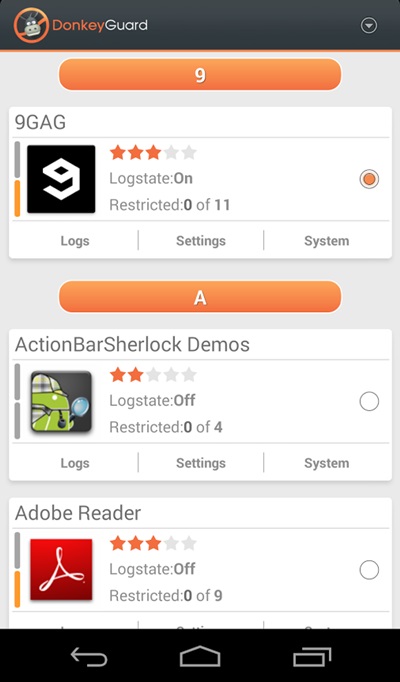
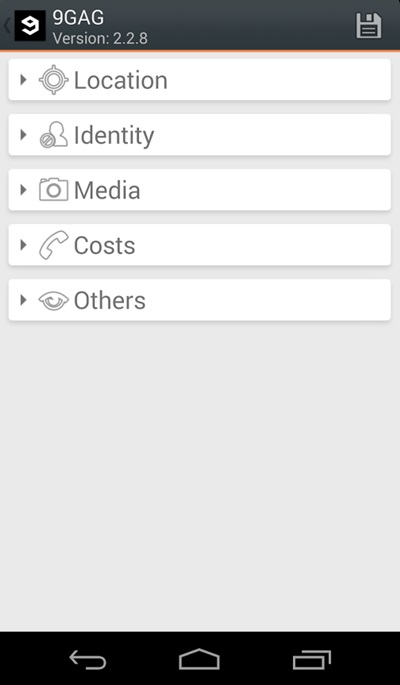
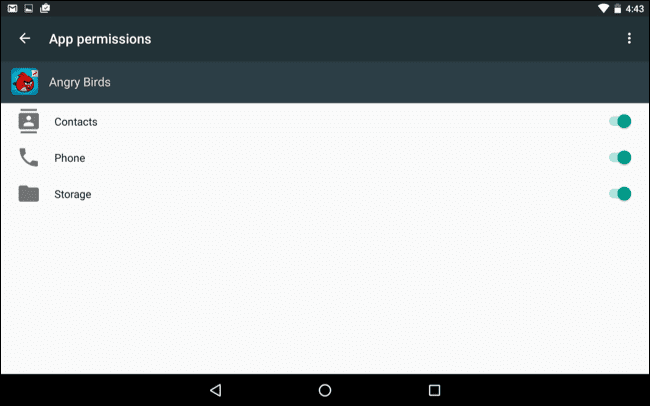
Steps To Protect Your Private Data From Android Apps: